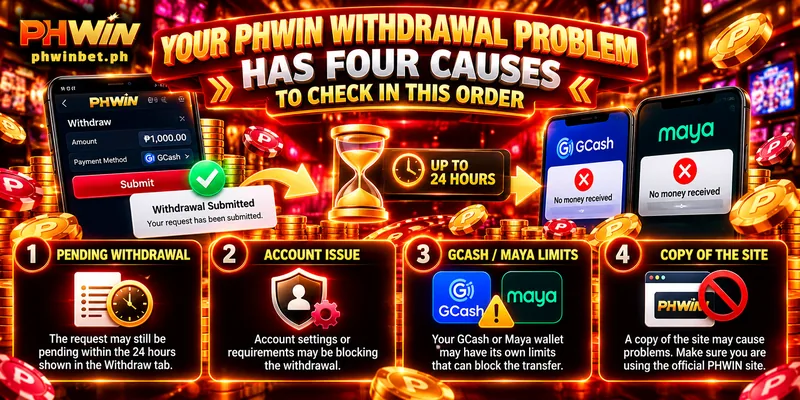
Your PHWIN Withdrawal Problem Has Four Causes to Check in This Order
A PHWIN withdrawal problem looks like one thing: you pressed Submit and no money reached your GCash or Maya wallet. A request inside the 24 hours the Withdraw tab shows may simply be pending, but four causes can block one at any hour, two of them outside your account: GCash’s own limits and a copy of the site. After 24 hours with all four clean, contact Customer Service.
Where Your Request Stands in the First 24 Hours
The Recent Withdrawal panel on the right of the Withdraw tab shows whether the request was sent at all. Until you send one, the panel reads No Withdrawal Request.
An empty panel means Submit never went through, which is how a problem with a PHWIN withdrawal not received can begin. Check the Transaction Password box first, the separate password every request asks for above Submit.
Once the panel lists the request, the request is pending inside the Withdrawal Time, the 24 hours per request printed on the Withdraw tab. Write down the minute you pressed Submit and count 24 hours from that minute.
So an empty panel points to a withdrawal problem at PHWIN that began at Submit, while a listed request turns the question into time and the four causes below.
Name on Card Versus Withdrawer Name: Where a Mismatch Hides
First, a PHWIN withdrawal failed over a name looks the same from outside as a slow request: the money is not in your wallet. PHWIN pays a request only when the name on the request matches the name on the wallet, and that name sits in two places filled in on different days.
Withdrawer Name is under My Account, in Personal Information. Name on Card is in the Account Management tab, where you linked the wallet and where a red notice warns that a mismatch means withdrawal failure.
Open GCash or Maya, read the name the wallet shows, and compare that name with both entries one character at a time. Four differences slip past anyone who reads the names at a glance:
- A middle name written in full in one place and as an initial in the other, such as Maria Santos Cruz in GCash and Maria S. Cruz in Personal Information.
- A suffix such as Jr. that the wallet shows and the entry does not.
- A doubled space between two parts of the name.
- A nickname typed where the full name of the payee belongs.
Read Account Number the same slow way, because one wrong digit starts a PHWIN withdrawal problem by sending the request to a number that is not yours.
You correct Withdrawer Name yourself: edit the field in Personal Information and press Submit. For a wrong Name on Card or Account Number, send Customer Service a screenshot of the Account Management entry together with the name your wallet shows.
A GCash Wallet That Is Not Fully Verified Blocks Large Requests
With the name settled, the next withdrawal problem at PHWIN sits in the wallet: a wallet that GCash has not fully verified cannot take a large request. This check applies to GCash only; if you withdraw to Maya, go on to the bonus check.
Choosing GCash on the Withdraw tab brings up a notice that tells you to confirm GCash has verified your account before you withdraw, and a wallet that GCash has not verified gets no payment.
GCash’s own limits explain why, and the GCash Help Center lists them by profile level:
| Profile level | Wallet holds up to | Takes in per month | A ₱20,000 request |
|---|---|---|---|
| Basic | ₱10,000 | ₱5,000 | Does not fit |
| Fully Verified | ₱500,000 | ₱500,000 | Fits |
Once the Basic limit is reached, the wallet stops accepting money until the limit resets on the 1st of the following month, so one ₱20,000 request, the maximum for a single request, is four times a Basic wallet’s whole month.
Open the GCash app and read your profile level. If the level is not Fully Verified, finish verification in the GCash app before you send another request; GCash reports the result by SMS after 3 days.
Splitting does not help here: PHWIN allows 20 requests a day, but a Basic wallet takes in ₱5,000 per month in total, however many requests carry the money.
A Bonus Wagering Requirement That Is Still Open
With the wallet checked, your account is next, because a bonus can hold part of the balance you see on screen. If you kept the default on the deposit screen, Do Not Participate In Any Promotions, no deposit bonus is attached and only the Sign-up Angpao case below applies.
While a bonus is in play, the bonus portion stays locked until the wagering requirement, the betting total the bonus asks for, is met. Three cases show how that looks on a request:
- First Deposit Bonus: 10x, and only Slot and Fish bets count toward the total.
- Daily First Cash-in Bonus, the bonus on your first deposit of each day: 5x on your deposit plus the bonus, with only Slot and Fish bets counting.
- Sign-up Angpao, the cash gift that comes with registration, or the App Golden Egg, the reward for downloading the app, before any deposit: you can withdraw ₱100 at most, so a larger request is above your limit.
For a withdrawal problem at PHWIN tied to a bonus, ask Customer Service for the amount still open on your account, since that figure depends on what you deposited and bet.
Two numbers decide the total here: the base and the multiple. A base of ₱800 at 5x asks for ₱4,000 of Slot or Fish bets (an example, not your account), and bets in other lobbies do not reduce that figure.
A Request Sent From a Copy Site Never Reaches Your PHWIN Account
Last, a request sent from a copy site never reaches your PHWIN account, because the domain phwinbet.ph is the only address PHWIN runs and every other address carrying the PHWIN name is a copy. The copy records the request, not your account.
No account setting can fix this PHWIN withdrawal problem, and the panel on the real site stays empty. Read the address bar before you log in, and look for a different ending after the dot or extra characters around the name.
Treat any request for your login password or Transaction Password as a reason to stop, whether the request arrives on a page, in a message or from someone offering to fix a withdrawal problem at PHWIN.
What to Send Customer Service About a PHWIN Withdrawal Problem
Contact Customer Service once 24 hours have passed and the panel, name, GCash profile, bonus and address all check out. Live chat runs 24/7, and the email is [email protected]. Send one message: your username, the Submit minute, the wallet and amount, and screenshots of the Recent Withdrawal panel and of the names in Personal Information and your wallet.